
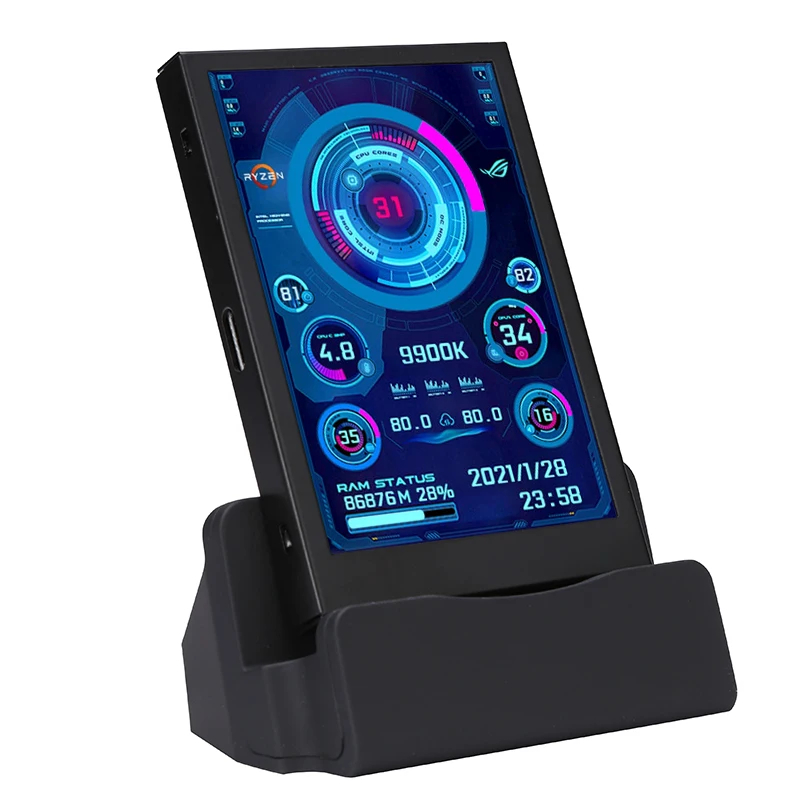
3.5 Inch IPS TYPE-C Secondary Screen Computer CPU GPU RAM HDD Display USB AIDA64
£19.99
Out of stock
Features
NEW AND IMPROVED STAND
Metal case, with back cover
Only a USB-C cable is needed to make it work; you don't need an HDMI cable
Support Windows only
Support horizontal and vertical screen switching,360°rotation
Energy saving and environmental protection
Turn off the screen automatically after shutdown
Comfortable eye protection
Brightness step-less adjustment
The Type-C connects to the secondary screen, and the USB link to the computer comes with a one-meter cable
Professional software,one-click operation
Change the background image with one click
One-click switch theme
Adjust brightness
Auto-start at boot
Set weather forecast of the city
Parameters
Display area: 50*74mm
Dimensions: 58*87mm
Resolution: 320*480
Thickness: 7~8mm
Viewing angle: IPS full viewing angle
Interface: USB-TYPE-C
Software
Download link:
https://www.adrive.com/public/GEnScZ/0128158%2035inchENG.rar
Or
https://drive.google.com/file/d/1C9kKLrdNBqP3G4Ei7wjNmx0m_ZX8aPYi/view?usp=sharing
Q&A
1. How to use?
Connect the mini secondary screen to your computer, and then start our customized software, no need for AIDA64, no need for other cumbersome settings
2. Why doesn't the graphics card data move?
General notebook users generally use independent monitors on standby and only use the core monitor to save power, and the secondary monitor monitors the more important independent monitor. Of course, the graphics card monitors the data and does not change.
3. Can other content be displayed?
No, it can only display the content of custom software settings in our app, which are hardware statistics of your device.
4. USB interface version?
USB1.0 USB2.0 USB3.0 unlimited, as long as it is USB
Package includes
1 x 3.5-inch display
1 x USB Type-C cable
1 x Bracket
1 x Double-sided tape